

The Standard version is made for employee computer monitoring at companies with small- to mid-sized IT infrastructure. This version is efficient for more modest needs thanks to its simple structure and near-instant setup and deployment on company computers.
LanAgent Standard performs two tasks that are vital for any company today: employee surveillance to ensure productive work time use and data leak prevention for confidential data. This is possible thanks to the application's activity monitor, which keeps a close eye on all activity on the corporate network.
LanAgent shows a full breakdown of how employee work time is spent, indicating how much time each employee has spent on computer games, instant messaging, and work-related tasks. Our employee tracking software both keeps employees on-task and promotes optimal time management. Another valuable feature in LanAgent Standard is its careful monitoring of the routes by which confidential data can be smuggled out of your company: removable disks, corporate email, social networks, instant messengers, Skype and printing. This means that you can pinpoint leak attempts and stop them before damage has been don.
Short description
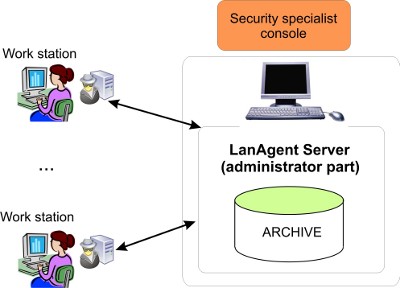
The program consists of two parts: the client part (agent) and the administrator part. The administrator part is installed on the administrator's computer, while agents are installed on users' computers. Agents monitor all users' activities on each computer and the administrator part collects information over the network (polls agents) for the administrator to be able to view the entire data on his computer and make a report. Client installation is remote and hidden.
LanAgent features:
- Logs all keystrokes;
- Screenshot recording;
- Application tracking and monitoring; allows you to block the launch of unwanted programs;
- calculates the operating time of each application and the time of its active use, as well as the total time of the computer, its active use and idle;
- Track IM chatting (Skype, Viber and etc);
- Records all websites visited, allows you to block unwanted web sites;
- Skype conversations monitoring;
- Email Correspondence Monitoring, Web mail monitoring;
- Printed documents tracking;
- External storages plugging and removing detection;
- Makes a shadow copy of files copied on a USB devices by employees;
- allows you to block the external storage media (flash drives, CD-DVD) plug-in;
- Extended analytical report system (PC activity, application usage, websites analytics);
- Software installation and removal monitoring;
- and etc.
Collected information (log) is stored in encrypted files on users' computers. It will be stored there until the administrator part sends a request to get logs. Log files will be cleared after they are sent. Logs are protected from removal, review and copying.
The architecture of the program is built so that the agent on a user's computer can run independently of the administrator part. Switching off the administrator's computer does not influence agents in any way. It means that if the administrator's computer is switched off, agents will save information to encrypted files on users' computers. Then you can switch on the administrator's computer and update the logs.
Information exchange is carried out via the TCP/IP protocol. All you have to know is only the IP address of the computer with the agent installed on it for the administrator part to able to connect to it.
Logs can be stored on users' computers as long as needed. Theoretically, their size is limited only by the size of free disk space. Note that the more logs users have the longer it will take for the administrator part to receive them.
Agents are launched at each Windows startup. By default, monitoring is also started at each Windows startup. If you want, you can disable starting monitoring automatically. To do it, select the computer you need in the list in the administrator part, right-click it and select the "User settings" item in the popup menu. After that you will see the "Start monitoring at Windows startup" checkbox. You can clear this checkbox and the agent will be launched at Windows startup, but it will not monitor anything, but just wait for commands from the administrator's computer.
