

Контроль рабочего времени персонала и организация информационной безопасности с помощью программы LanAgent
Одной из важнейших задач, решаемой руководителем любой организации, является задача рационального использования рабочего времени сотрудников.
Ни для кого не является секретом, что помимо основной деятельности, большинство работников в течение рабочего дня также успевают заниматься своими личными делами, используя офисную технику.
В ряде случаев это допустимо, потому как действительно невозможно безотрывно работать все 8 часов подряд, а после небольшого перерыва производительность труда, как правило, повышается. Однако, к сожалению, имеют место и обратные ситуации, когда сотрудники делают небольшие перерывы в развлечениях, чтобы немного поработать.
По сути, тем самым они обворовывают своего работодателя как напрямую, так и косвенно.
Напрямую – за счет бесполезного, а иногда и опасного (вирусы, трояны, которые можно легко подхватить на различных развлекательных и порнографических сайтах) для предприятия Интернет трафика. Косвенно – за счет упущенной выгоды: из-за простоя производственных мощностей, не выполненных в срок работ и т.д.
Особенно часто такая тенденция наблюдается во время отсутствия руководителя, например, когда он в командировке. Кроме того, контролировать лично действия каждого работника в организации, где работает свыше 10 человек, - сложная и зачастую просто невыполнимая задача.
Также, очень важной является проблема утечек ценной и конфиденциальной информации из-за действий так называемых инсайдеров (сотрудников самой организации, случайно или намеренно совершающих действия, которые могут привести к раскрытию конфиденциальной информации конкурентам или злоумышленникам).
Так, по данным ежегодного обзора компьютерных преступлений «E-Crime Watch Survey», в вопросах кражи интеллектуальной собственности и персональных данных инсайдеры заметно лидируют перед внешними преступниками (хакерами, об опасности которых мы хорошо осведомлены из прессы).
На решение обеих обозначенных выше задач (контроля рабочего времени и организации информационной безопасности) и нацелена разработанная российской компанией «Нетворк Профи» программа LanAgent.
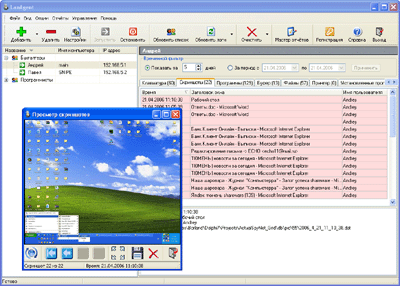
LanAgent позволяет контролировать деятельность сотрудников Вашей организации, работающих за компьютером, а также вести статистику использования компьютерного времени. При этом LanAgent выполняет следующие действия:
- Запоминает запуск и закрытие программ.
- Определяет подключение и отключение носителей информации, таких как флеш-накопители, жесткие диски.
- Делает снимки экранов мониторов (скриншоты) по - команде или через заданный промежуток времени.
- Запоминает набираемый на клавиатуре текст.
- Следит за содержимым буфера обмена.
- Перехватывает посещённые пользователями сайты.
- Ведет учет соединений с интернет.
- Запоминает установку и удаление программ.
- Ведет статистику создания, изменения и удаления файлов и папок.
- Ведет учет документов, отправленных на печать на принтер.
- Отслеживает включение/выключение компьютера.
Ведение лога запускаемых программ, отслеживание содержимого буфера обмена, а также соединений с интернет и посещенных сайтов, позволяет выявлять деятельность пользователей, не имеющую отношения к работе, а также те действия, которые могут быть опасными для организации (копирование важных файлов, установка вредоносных программ). Снимки экранов компьютеров (скриншоты) дают возможность визуального контроля.
Среди уникальных особенностей программы LanAgent можно назвать:
- Невидимость во всех операционных системах (даже в процессах Windows NT/2000/XP/2003/Vista).
- Возможность при запоминании нажатых на клавиатуре клавиш различать регистр, а при просмотре истории нажатых клавиш, исключить из просмотра системные клавиши.
- Расширенную систему поиска по истории событий, а также возможность установки ограничения, при запоминании содержимого буфера обмена.
Также, важной особенностью LanAgent является расширенная система отчетов, позволяющая не только представить всю информацию в удобном для Вас виде, но и создавать вычисляемые аналитические отчеты, содержащие обобщенные статистические данные по наиболее важным показателям: общее время работы и время простоя компьютерной техники, время работы пользователя в конкретной программе, количество посещений каждого web-сайта и т.д.
Вся информация в LanAgent хранится централизованно в базе данных, имеется возможность автоматического получения статистики от контролируемых компьютеров, информация передается по сети в зашифрованном виде.
