


Внутренние угрозы. Организация информационной безопасности с помощью программы LanAgent
В условиях современного бизнеса, перед любой организацией, работающей с персональными данными, имеющей свой список клиентов или занимающейся разработками в каких либо областях, рано или поздно встает вопрос защиты своих данных, обнаружения и предотвращения утечек информации.
Кроме внешних угроз, таких как хакерские атаки и вирусы, которые у всех на слуху и для борьбы с которыми разработано достаточное количество эффективных средств, имеется еще и внутренние угрозы со стороны инсайдеров, т.е. сотрудников компании, которые со злым умыслом или по незнанию передают третьей стороне информацию, составляющую коммерческую тайну. Как раз внутренние угрозы и представляют наибольшую опасность для предприятия, потому что во-первых инсайдеры действуют изнутри и как правило не ограничены во времени, а во-вторых, потенциально инсайдером может быть любой сотрудник организации.
Инсайдеров, действующих из корыстных побуждений достаточно легко себе представить, это может быть например менеджер компании, «сливающий» проекты на сторону. Такие случаи отнюдь не редки. Что же касается случаев утечки информации по неосторожности (а таких случаев значительно больше), то вот простой пример: сотрудник записал какие-то документы на флешку, чтобы поработать с ними на домашнем компьютере, но по дороге домой флешка выпала из кармана в общественном транспорте. Или пусть даже он принес информацию домой и успешно завершил работу, но через некоторое время вышел из строя домашний компьютер этого сотрудника и он отнес его на ремонт вместе с жесткими дисками.
И в том и в другом случае, информация попадает к третьим лицам, которые могут воспользоваться ей по своему усмотрению. Также не редкость ситуация, когда технический специалист пытаясь найти ответ на поставленный перед ним производственный вопрос, описывает на форумах детали, которые являются "ноу-хау" компании или просто закрытами сведениями.
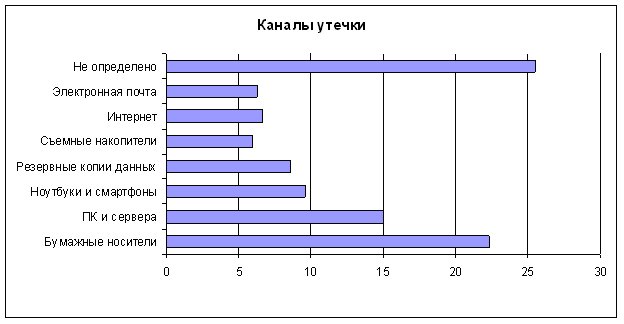
Согласно данным проведенного в 2016 году опроса, наиболее "популярными" являются следующие каналы утечки информации:
- Документы, распечатанные на принтере.
- Переносные запоминающие устройства.
- Электронная почта
- Интернет (web почта, форумы).
- Интернет-пейджеры (ICQ, mail.ru agent, ...).
Многие организации, не имеющие средств мониторинга действий пользователей, узнают о случившейся утечке по косвенным признакам: уходу ключевого клиента, появлении в открытом доступе конфиденциальной информации, шантаже раскрытия данных с каким-либо требованиями. В таких случаях, канал утечек обычно не определен.
Организации, заботящиеся о сохранности своих данных, как правило, успевают обнаружить происходящую утечку и принять меры по ее устранению. Или хотя бы уменьшению ее последствий.
Как видно из диаграммы, значительная часть утечек происходит при выносе за пределы организации распечатанных на принтере важных сведений, либо так или иначе связана с интернет.
Объяснение этому простое - сотрудники, которым для работы требуется печатать документы, считают, что пара дополнительных листиков не вызовет никакого подозрения у находящихся рядом коллег. Это простое действие и для него не нужно что-то мудрить с почтой или другими программами, трафик которых пойдет через прокси-сервер. И в тех случаях, когда в компании не используется ПО, ведущее контроль печати документов, с сохранением их содержимого, такая утечка действительно проходит незамеченной.
Следующие по масштабности каналы, использующие интернет. Сложность защиты данных от утечек через них в том, что полностью перекрыть выход в интернет, либо сильно его ограничить как правило невозможно. Электронная почта, программы обмена сообщениями - все это неотъемлемая часть работы многих сотрудников. Если просто закрыть их технически, то могут страдать бизнес-процессы.
Да, лишние программы и сайты можно и даже нужно ограничивать на прокси-сервере, однако почту, скайп, файлообменники можно использовать как для работы, так и для выноса ценной информации. В определении какого рода письмо было отправлено работником, прокси-сервер не помощник.
Аналогичная ситуация и с использованием съемных накопителей. Некоторым сотрудникам они необходимы для работы.
Тем не менее, выход из данной ситуации есть! Достаточно просто поставить под контроль основные информационные потоки: передачу файлов через интернет, почтовую переписку, обмен сообщениями, печать документов, работу с носителями информации. И сделать это позволяет разработанный нами программный комплекс LanAgent! С его помощью вы сможете не только контролировать передаваемые данные, но и получать детальную картину рабочего дня сотрудников.
Среди основных возможностей LanAgent следует отметить:
- Определение фактов подключения съемных usb носителей информации, и возможность "теневой копии" копируемых на них файлов.
- Перехват сообщений интернет-пейджеров, таких как ICQ, mail.ru agent, MSN, ...
- Перехват почтовых сообщений, как отправленных и полученных через почтовых клиентов, так и отправленных через web - почту. При этом сохраняются и прикрепленные к письмам файлы.
- Контроль посещаемых пользователями веб сайтов и выкладываемых в Интернет файлов. Возможностью запрета открытия сайтов по спискам разрешенных и запрещенных ресурсов.
- Запоминание всех текстов, набираемый на клавиатуре и копируемых в буфер обмена.
- Логирование запуска и закрытия программ, а также возможность заблокировать их запуск.
- Выполнение снимков экранов мониторов пользователей (скриншотов) по - команде или через заданный промежуток времени.
- Учет документов, отправленных на печать на принтер.
- Оповещение об обнаруженных нарушениях политик безопасности.
Интерфейс программы LanAgent простой и удобный в использовании, развертывание комплекса в сети предприятия производится быстро и незаметно для контролируемых сотрудников.
Таким образом, при помощи программы LanAgent Вы получите комплексную картину действий пользователей на рабочем месте, что поможет выявить сотрудников как умышленно выносящих за пределы предприятия ценную информацию, так и разглашающих ее по неосторожности.
